Hasilnya lebih duluResults first
Ini klip yang keluar. Bukan mockup.These are the clips it makes. Not mockups.
Keempat klip di bawah keluar utuh dari ninclip: subtitle, hook, dan bingkai yang mengikuti wajah sudah menempel di filenya. Tidak satu pun disentuh editor lain.All four came straight out of ninclip: captions, hook, and face-tracking crop already baked into the file. No other editor touched them.
9:16 · tanpa watermark · siap unggah9:16 · no watermark · ready to upload
GAYA CAPTIONCAPTION STYLES
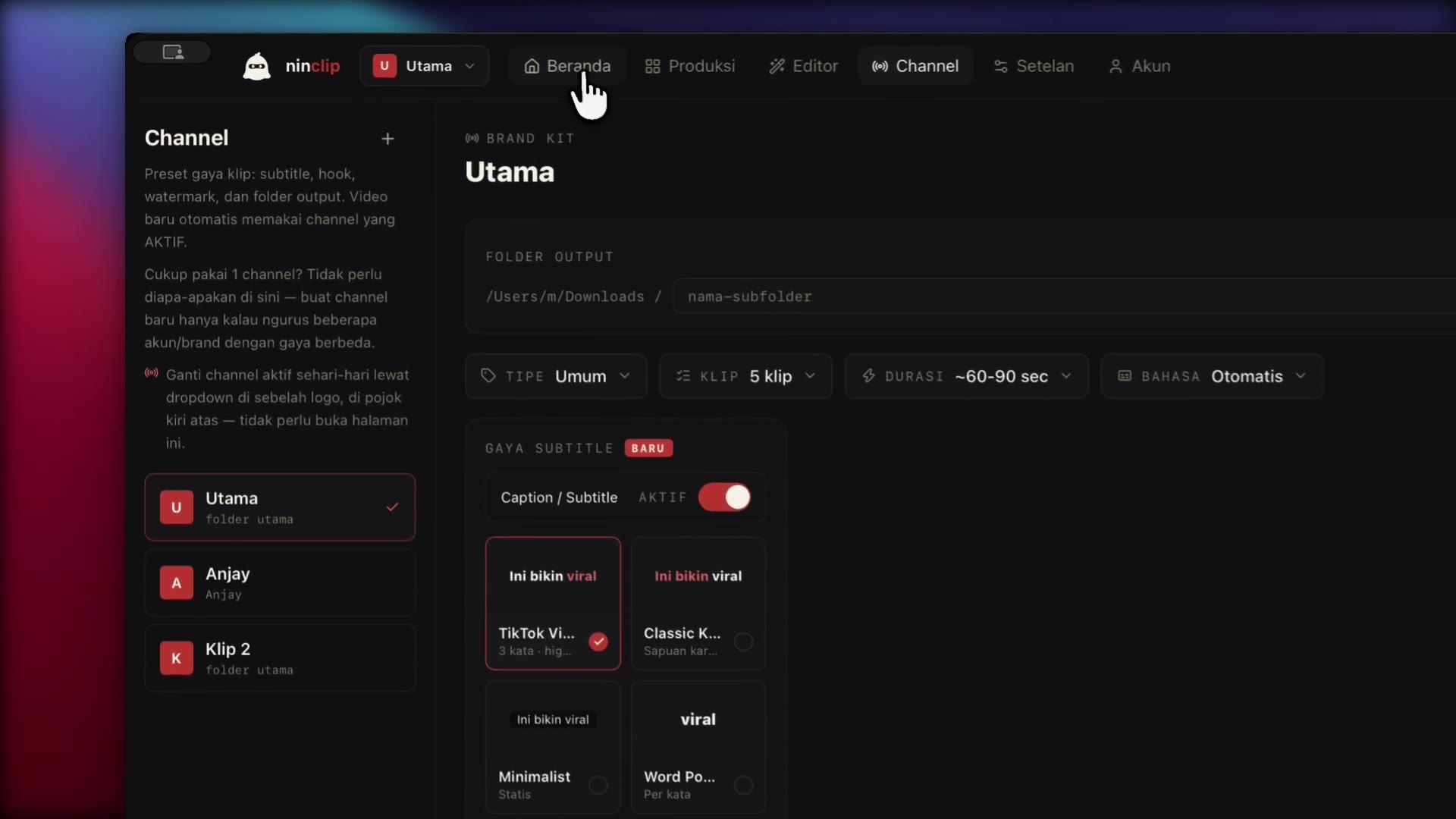
Dua belas gaya caption, supaya klipmu tidak seragam dengan semua orang.Twelve caption looks, so your clips stop resembling everyone else's.
Tiap kotak di bawah ini keluar dari ninclip memakai preset yang sama yang kamu dapat. Warna, garis tepi, animasi kata, dan emoji bisa kamu ubah semua.Every tile below comes out of ninclip using the same preset you get. Colour, outline, word animation, and emoji are all yours to change.
SEMUANYA BISA DISETELEVERY KNOB IS EXPOSED
AplikasinyaThe app
Dua menit menonton, kamu paham seluruh alurnyaTwo minutes of watching and you know the whole flow
Rekaman layar tanpa potongan: tempel tautan, tinggalkan, lalu ambil hasilnya.An uncut screen recording: paste a link, walk away, then collect the clips.
Papan produksiProduction board
Antrikan malam ini, paginya sudah jadiQueue it tonight, it's done by morning
Kartu videomu berjalan sendiri melewati lima kolom. Kamu tidak perlu menunggui satu video selesai untuk memulai yang berikutnya.Your video cards move themselves through five columns. You never wait for one video to finish before starting the next.
Klik fase untuk melompatClick a phase to jump
Fase 01 / 05Phase 01 / 05
Tempel tautan atau tarik filenyaPaste a link or drop the file
Satu tautan YouTube, playlist, channel, atau file lokal per kartu. Antriannya otomatis: yang masuk lebih dulu, keluar lebih dulu.One YouTube link, playlist, channel or local file per card. The queue runs itself: first in, first out.
Fase 02 / 05Phase 02 / 05
AI membaca transkrip, menimbang hook dan payoffAI reads the transcript, weighs hook and payoff
Whisper menyalin suara menjadi teks. Model AI pilihanmu merangkum lalu menilai setiap momen. Yang naik ke kartu hanya momen yang berdiri sendiri.Whisper turns speech into text. Your chosen model summarises, then scores each moment. Only moments that stand on their own reach a card.
Fase 03 / 05Phase 03 / 05
Kamu yang memutuskan mana yang tayangYou decide what actually goes out
Setiap klip datang dengan skor dan pratinjau vertikal. Centang yang kamu mau, lewati sisanya. Tidak ada kuota yang terbuang.Every clip arrives with a score and a vertical preview. Tick the ones you want, skip the rest. No quota burned either way.
Fase 04 / 05Phase 04 / 05
ffmpeg bekerja di laptopmuffmpeg works on your laptop
Memotong, membingkai, membakar subtitle, menempel hook: semuanya berjalan luring. Tanpa unggahan, tanpa antre, tanpa biaya per menit.Cutting, framing, burnt-in captions, hook overlay: all of it offline. No upload, no queue, no per-minute cost.
Fase 05 / 05Phase 05 / 05
File final, langsung tempel ke semua feedFinal files, straight into every feed
9:16 untuk TikTok, Reels, dan Shorts. Tanpa watermark. Tarik ke uploader, tidak perlu diproses ulang.9:16 for TikTok, Reels and Shorts. No watermark. Drag them into the uploader. Nothing to re-export.
Yang kamu dapatWhat you get
Ini pekerjaan yang berhenti kamu lakukan.This is the work you stop doing.
Sepuluh episode berjalan sekaligusTen episodes running at once
Tumpuk seluruh tunggakan episode jadi kartu. Kartunya berjalan sendiri melewati Sumber → Analisis → Tinjau → Render sementara kamu tidur atau merekam lagi.Stack your whole episode backlog as cards. They move themselves through Source → Analyse → Review → Render while you sleep or record the next one.
Berhenti menyisir timeline mencari momen bagusStop scrubbing the timeline for good moments
Transkrip dibaca utuh dari awal sampai akhir. Klip dinilai dengan rubrik hook, alur, dan nilai, lalu dibaca ulang agar tetap masuk akal tanpa konteks episodenya.The full transcript is read end to end. Clips are scored on hook, flow, and value, then re-read so they still make sense without the episode around them.
Tidak ada klip yang terpotong di tengah napasNo clip ever cuts off mid-breath
Awal dan akhir dicocokkan ke kutipan asli di transkrip, lalu dirapatkan ke batas kalimat. Penonton mendengar kalimat yang utuh.Start and end are matched to the exact quotes in the transcript, then snapped to sentence boundaries. Viewers hear whole sentences.
Wajah selalu di dalam bingkai, bukan mejaThe face stays in frame, not the table
Deteksi wajah lokal plus deteksi pergantian shot: bingkainya berpindah mengikuti orang yang sedang bicara. Podcast dua orang bisa ditumpuk jadi dua panel.Local face detection plus shot-change detection: the crop follows whoever is talking. Two-person podcasts can stack into two panels.
Subtitle sudah terbakar, empat gaya siap pakaiCaptions already burnt in, four styles ready
TikTok viral, karaoke, minimalis, word-pop, plus hook di empat detik pertama. Tidak perlu mampir ke aplikasi edit lain setelah render.TikTok viral, karaoke, minimal, word-pop, plus a hook over the first four seconds. No detour through another editor after rendering.
Satu channel, satu identitas, termasuk untuk klienOne channel, one identity, clients included
Gaya subtitle, hook, watermark, dan folder keluaran tersimpan per channel. Ganti channel, seluruh setelan ikut berpindah.Caption style, hook, watermark and output folder are saved per channel. Switch channel and every setting follows.
Kenapa klipnya nyambungWhy the clips make sense
AI-nya membaca tiga kali sebelum memotongThe AI reads three times before it cuts
Clipper lain memotong dari satu kali tebakan. ninclip menjalankan tiga tahap, dan tahap ketiga membaca ulang klipmu seperti penonton yang belum menonton episodenya.Other clippers cut from a single guess. ninclip runs three passes, and the third re-reads your clip the way someone who missed the episode would.
01
Pahami dulu keseluruhan episodeUnderstand the whole episode first
Satu panggilan merangkum seluruh video menjadi ringkasan dan peta topik. Setiap penilaian sesudahnya diukur terhadap gambaran utuh ini.One call condenses the entire video into a summary and topic map. Every later judgement is measured against that whole picture.
02
Nilai tiap kandidat dengan rubrik yang samaScore every candidate against the same rubric
Struktur hook → isi → payoff wajib ada. Waktunya tidak ditebak: kalimat pembuka dan penutup dikutip persis dari transkrip, lalu posisinya dicari kembali.A hook → body → payoff structure is required. Timing isn't guessed: opening and closing lines are quoted verbatim from the transcript, then located again.
03
Verifikasi seperti penontonVerify it like a viewer
Kandidat terbaik dibaca ulang sebagai teks klip yang utuh. Yang menggantung diperbaiki ujungnya; yang butuh konteks luar dibuang sebelum sampai ke kartu.The best candidates are re-read as complete clip text. Dangling endings get fixed; anything needing outside context is dropped before it reaches a card.
Yang keluar dari laptopmu hanya teks transkripnya; videonya tetap di diskmu.The only thing that leaves your laptop is transcript text; the video stays on your disk.
BandingkanCompare
Render lokal kini banyak. Papan produksinya cuma di sini.Local rendering is common now. The production board isn't.
Sekarang ada beberapa clipper desktop Indonesia yang juga render lokal dan sekali bayar. Bagus, artinya kamu memang tidak perlu lagi menyewa server orang. Pertanyaan yang lebih menentukan: bisakah alatnya mengantre sepuluh episode sekaligus, memverifikasi klipnya sebelum kamu tonton, dan memakai kunci AI milikmu sendiri?Several Indonesian desktop clippers now render locally for a one-time fee. Good, that means nobody has to rent someone's server anymore. The deciding question is the next one: can the tool queue ten episodes at once, verify each clip before you watch it, and run on your own AI key?
| Yang kamu bandingkanWhat you're comparing | ninclip | Clipper lokal lainOther local clippers | Opus Clip | Vidyo.ai | Riverside |
|---|---|---|---|---|---|
| BiayaCost | Rp199.000, sekali bayar untuk selamanyaRp199,000 once, forever | Umumnya sekali bayarUsually one-time | $19/bulan$19/mo | $30/bulan$30/mo | $15/bulan$15/mo |
| Tempat renderWhere it renders | Di laptopmuOn your laptop | Di laptopmuOn your laptop | Di server merekaOn their servers | Di server merekaOn their servers | Di server merekaOn their servers |
| Antre banyak videoBatching videos | Papan produksi, jalan sendiriProduction board, runs itself | Satu video per prosesOne video per run | Antrean cloud berkuotaMetered cloud queue | Antrean cloud berkuotaMetered cloud queue | Antrean cloud berkuotaMetered cloud queue |
| Verifikasi klipClip verification | 3 tahap, dibaca ulang3 passes, re-read | BervariasiVaries | Skor sekali jalanSingle-pass score | Skor sekali jalanSingle-pass score | Skor sekali jalanSingle-pass score |
| Model AIAI model | Kuncimu sendiri, provider apa punYour own key, any provider | Umumnya sudah dipatokUsually fixed | Kunci vendorVendor key | Kunci vendorVendor key | Kunci vendorVendor key |
| Brand kit per channelPer-channel brand kit | Gaya & folder per channelStyle & folder per channel | BervariasiVaries | Template globalGlobal template | Template globalGlobal template | Template globalGlobal template |
| Batas renderRender cap | Tanpa batasUnlimited | Tanpa batasUnlimited | Kuota menit/bulanMonthly minute quota | Kuota menit/bulanMonthly minute quota | Kuota menit/bulanMonthly minute quota |
Harga kompetitor berubah sewaktu-waktu, jadi periksa situs mereka untuk angka terkini. Perbandingan ini disusun dari halaman harga publik mereka.Competitor pricing changes over time, so check their sites for current numbers. This comparison is drawn from their public pricing pages.
Kolom “Clipper lokal lain” adalah gambaran umum kategori. Kini ada beberapa produk desktop Indonesia dengan render lokal sekali bayar di kisaran harga yang sama. Perbedaannya ada di baris antrean batch, verifikasi klip, dan kunci AI. Periksa sendiri sebelum memutuskan; kami tidak mengklaim mewakili produk tertentu.The “other local clippers” column describes the category, not one product. Several Indonesian desktop tools now offer local, one-time-fee rendering at a similar price. The difference sits in the batch-queue, clip-verification and AI-key rows. Check for yourself before deciding; we don't claim to speak for any specific product.
HargaPricing
Coba gratis dulu. Bayar kalau memang terpakai.Try it free first. Pay only if it earns its place.
Coba duluTry it first
Rp0
Tiga video penuh dengan semua fitur menyala. Tanpa kartu kredit, tanpa watermark pada hasilnya.Three full videos with every feature on. No credit card, no watermark on the output.
- 3 video, tanpa batas jumlah klip per video3 videos, unlimited clips per video
- Semua gaya subtitle dan auto-reframe menyalaEvery caption style and auto-reframe switched on
- Mac (Apple Silicon) & WindowsMac (Apple Silicon) & Windows
Daftar 30 detik, installer langsung bisa diunduh.30 seconds to sign up, installer downloads straight away.
Lisensi ninclip · sekali bayarninclip licence · one-time
Rp199.000
Sekali bayar, dipakai selamanya, pembaruan termasuk. Tanpa tagihan bulanan, tanpa biaya per video.Pay once, use it forever, updates included. No monthly bill, no per-video fee.
Setara Rp16.600/bulan di tahun pertama, lalu Rp0 selamanyaWorks out to Rp16,600/month in year one, then Rp0 forever
- Render tanpa batas, nol rupiah per klip, selamanyaUnlimited rendering, zero cost per clip, forever
- Pakai model AI yang kamu percaya: DeepSeek, Groq, Gemini, OllamaUse the AI model you trust: DeepSeek, Groq, Gemini, Ollama
- Satu lisensi untuk Mac dan Windows, pembaruan termasukOne licence covers Mac and Windows, updates included
- Aktif dalam hitungan detik setelah pembayaranActive within seconds of payment
- Harga terkunci: batch berikutnya naik, kamu tetap di harga iniPrice locked in: the next batch costs more, you stay here
Pembayaran lewat SentraLink: QRIS, transfer bank, atau e-wallet. Struk dan kode aktivasi langsung masuk ke emailmu.Paid via SentraLink: QRIS, bank transfer or e-wallet. Receipt and activation code land in your inbox.
Lisensi kamuYour licenceSudah aktifAlready active
Kamu sudah jadi member ninclip, tidak perlu bayar lagi. Kelola lisensi, unduh installer, dan cek sisa kuota di halaman akun.You're already a ninclip member, so there is nothing more to pay. Manage your licence, download the installer, and check your quota from your account page.
Buka akun kamuOpen your accountKeberatan yang wajarFair objections
Pertanyaan yang biasanya muncul sebelum bayarWhat people ask right before they buy
Apa bedanya dengan Opus Clip?How is this different from Opus Clip?
Opus merender di server mereka dan menagih kuota menit setiap bulan; videomu harus diunggah lebih dulu. ninclip merender di laptopmu memakai ffmpeg: tanpa unggahan, tanpa kuota, dan setelah lisensinya dibayar tidak ada biaya per klip. Bedanya paling terasa kalau kamu memproses banyak episode: di sini antrean panjang tidak menambah tagihan.Opus renders on their servers and bills a monthly minute quota; your video has to be uploaded first. ninclip renders on your laptop with ffmpeg: no upload, no quota, and once the licence is paid there is no per-clip cost. The gap shows most when you process many episodes: here a long queue doesn't grow the bill.
Kenapa tidak berlangganan saja, kan lebih murah di awal?Why not just subscribe? It's cheaper up front.
Karena kami tidak menanggung biaya server render, jadi tidak ada yang perlu ditagihkan bulanan. Rp199.000 sekali bayar sudah termasuk pembaruan. Satu-satunya biaya berjalan adalah token AI, dan itu memakai kunci milikmu sendiri, jadi kamu yang memegang kendali biayanya.Because we carry no render-server cost, so there's nothing to bill monthly. Rp199,000 once includes updates. The only running cost is AI tokens, and those run on your own key, so you control that number.
Kunci AI saya benar-benar tidak dikirim ke server kalian?Is my AI key really never sent to your servers?
Benar. Kunci disimpan di komputermu dan dipakai langsung dari aplikasi ke penyedia yang kamu pilih. Kami tidak punya server yang menerimanya. Kalau kamu ingin nol koneksi keluar, pakai model lokal lewat Ollama atau LM Studio. ninclip menerima endpoint apa pun yang bicara format OpenAI.Correct. The key stays on your computer and is used directly from the app to the provider you chose. We have no server that receives it. If you want zero outbound calls at all, run a local model through Ollama or LM Studio. ninclip accepts any OpenAI-compatible endpoint.
Videonya diunggah ke mana?Where does my video get uploaded?
Tidak ke mana-mana. Video, frame, dan hasil render tetap di diskmu. Yang dibaca AI hanya teks transkripnya. Deteksi wajah untuk auto-reframe juga berjalan lokal. Tidak ada satu frame pun yang keluar.Nowhere. Video, frames and renders all stay on your disk. The AI only ever sees transcript text. Face detection for auto-reframe also runs locally. Not a single frame leaves.
Kalau tidak puas bagaimana?What if I'm not happy with it?
Tiga video pertama gratis dan tanpa kartu kredit. Di situlah tempatnya mengujinya, dengan video aslimu, sebelum ada uang berpindah. Kalau hasilnya tidak menghemat waktumu, jangan dibeli. Kalau sudah beli lalu ada yang tidak jalan di mesinmu, kirim email; kami bantu sampai jalan atau uangmu kami kembalikan.The first three videos are free and need no card. That's where you test it, on your own footage, before any money moves. If it doesn't save you time, don't buy. If you already bought and something won't run on your machine, email us; we'll get it working or refund you.
Ada dukungan bahasa Indonesia?Is there Indonesian-language support?
Antarmuka, subtitle, dan dukungan semuanya bahasa Indonesia. Aplikasinya dibuat di Indonesia untuk kreator di sini. Transkrip bahasa Indonesia ditangani lewat caption YouTube, atau Whisper lokal kalau captionnya tidak tersedia.The interface, captions and support are all available in Indonesian. The app is built in Indonesia for creators here. Indonesian transcripts come from YouTube captions, or local Whisper when captions are missing.
Bedanya dengan clipper lokal lain yang juga render lokal dan sekali bayar?How is this different from other local, one-time-fee clippers?
Render lokal dan sekali bayar sekarang memang bukan milik kami sendiri, dan itu kabar baik buat kamu. Tiga hal yang belum ditawarkan yang lain: papan produksi yang mengantre banyak episode dan berjalan tanpa ditunggui; verifikasi tiga tahap yang membaca ulang tiap klip sebagai teks utuh sebelum naik ke kartu; dan kunci AI milikmu sendiri, jadi kualitas model serta biaya tokennya kamu yang tentukan, bukan dipatok vendor. Kalau kebutuhanmu hanya satu video sesekali, clipper lain sudah cukup. Kami lebih cocok untuk yang memproduksi rutin.Local rendering and one-time pricing aren't ours alone any more, and that's good news for you. Three things the others don't offer: a production board that queues many episodes and runs unattended; three-pass verification that re-reads each clip as complete text before it reaches a card; and your own AI key, so model quality and token cost are your call rather than a vendor's. If you only cut the occasional single video, another clipper will do. We fit people producing on a schedule.
Sudah beli, mulai dari mana?I already paid, where do I start?
Buka halaman Aktivasi, masukkan kode order dan email yang kamu pakai saat membeli. Akunnya langsung aktif. Unduh installer di halaman akun, atau masuk langsung dari aplikasi ninclip memakai kode yang dikirim ke email.Open the Activation page and enter the order code plus the email you paid with. The account activates immediately. Download the installer from your account page, or sign in from the ninclip app with the code we email you.
Muncul peringatan "ninclip is damaged" di Mac atau SmartScreen di Windows?I see an "ninclip is damaged" warning on Mac, or SmartScreen on Windows?
Itu peringatan bawaan sistem untuk aplikasi baru yang belum punya banyak unduhan, aplikasinya sendiri baik-baik saja. Di Mac, jalankan satu perintah Terminal sekali setelah instalasi; di Windows, klik More info lalu Run anyway. Langkah lengkap dengan perintah yang bisa disalin ada di halaman Unduh.That is the system's default warning for a new app without many downloads yet; the app itself is fine. On Mac, run one Terminal command once after installing; on Windows, click More info, then Run anyway. The full steps, with a copyable command, are on the Download page.